
Encountering temporary connectivity hurdles or slow loading speeds when trying to access your favorite gaming hub is usually caused by local ISP domain filtering or congested default network resolvers. Learning How to Change DNS VT8 configuration in 2026 provides a reliable, permanent technical solution that restores high-speed access across all your personal devices. By replacing your internet provider’s default Domain Name System (DNS) with high-performance public resolvers like Cloudflare or Google, you route network traffic through faster, unblocked infrastructure. This simple adjustment eliminates local DNS blocking, lowers latency during live betting sessions, and protects your data using modern encryption protocols. Whether you connect via a desktop computer or a mobile device, configuring your DNS settings ensures smooth, uninterrupted access to VT8.

Technical Core Benefits of Changing DNS for Seamless Connectivity
Updating your device’s DNS settings alters how domain names are translated into IP addresses, offering immediate operational advantages.
- Bypassing ISP Domain Filtering: Bypasses local network restrictions by querying independent global servers rather than restricted provider databases.
- Latency & Ping Reduction: Routes requests through optimized global server networks to minimize ping times during live casino streams.
- Enhanced Security & Encryption: Utilizes modern DNS-over-HTTPS (DoH) standards to safeguard your browsing requests from third-party interception.
- Preventing Disconnections: Eliminates random mid-game disconnects caused by unstable local provider DNS servers on VT8.
DNS Resolution Speed and Network Routing Performance
When you enter a website address, your device sends a query to convert that URL into a numeric IP address. Default ISP resolvers are often overworked and subject to local filters. Switching to premium public DNS services speeds up these lookup times significantly, ensuring every page load, bet placement, and account interaction responds instantly on VT8.

Recommended Public DNS Server Addresses and Configuration Matrix
Refer to the matrix below to choose the best public DNS provider and parameters for your network setup when applying How to Change DNS VT8 procedures.
| DNS Provider | Preferred IPv4 Address | Alternate IPv4 Address | Primary Technical Advantages |
| Cloudflare DNS | 1.1.1.1 | 1.0.0.1 | Ultra-fast response times, top privacy rating, zero logging |
| Google Public DNS | 8.8.8.8 | 8.8.4.4 | High global availability, reliable uptime, strong infrastructure |
| OpenDNS (Cisco) | 208.67.222.222 | 208.67.220.220 | Advanced security filtering, stable routing, anti-phishing |
| Quad9 DNS | 9.9.9.9 | 149.112.112.112 | Malicious domain blocking, privacy-focused, robust protection on VT8 |
Clearing DNS Cache (Flush DNS) Post-Configuration
After updating your DNS settings, your operating system may still hold outdated routing paths in its local resolver cache. Clearing this cache forces your system to use the new DNS settings immediately. On Windows, open Command Prompt and execute ipconfig /flushdns. On macOS, open Terminal and run sudo dscacheutil -flushcache; sudo killall -HUP mDNSResponder to clear all old cached entries for VT8.
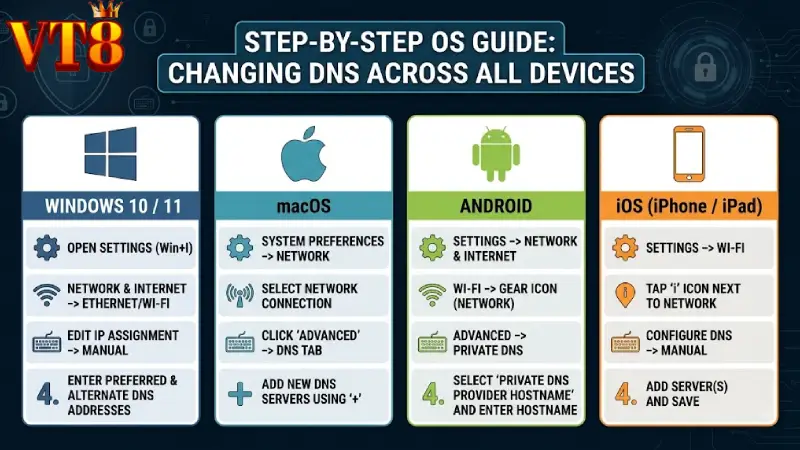
Step-by-Step OS Guide: Changing DNS Across All Devices
Follow these operating system-specific procedures to update your network settings in just a few minutes.
Windows 10 / 11:
- Open Settings > Network & Internet > Status (or Advanced network settings).
- Click Change adapter options, right-click your active connection (Wi-Fi or Ethernet), and select Properties.
- Highlight Internet Protocol Version 4 (TCP/IPv4) and click Properties.
- Select Use the following DNS server addresses, enter 1.1.1.1 as Preferred and 1.0.0.1 as Alternate, then click OK.
macOS:
- Open System Settings > Network and select your active Wi-Fi or Ethernet connection.
- Click Details… (or Advanced) and select the DNS tab.
- Click the + button under DNS Servers, add 1.1.1.1 and 1.0.0.1, then click OK and Apply.
Android:
- Open Settings > Network & Internet (or Connections).
- Tap Private DNS (or search for Private DNS in settings).
- Select Private DNS provider hostname, enter one.one.one.one (for Cloudflare) or dns.google (for Google), and tap Save.
iOS (iPhone / iPad):
- Open Settings > Wi-Fi and tap the (i) info icon next to your connected Wi-Fi network.
- Scroll down and tap Configure DNS, then select Manual.
- Remove existing servers, tap Add Server, enter 1.1.1.1 and 1.0.0.1, then tap Save to apply settings for VT8.
Troubleshooting Connection Issues and Verifying DNS Status
If you still encounter connection delays after updating your settings, verify that your new configuration is active by visiting an online DNS leak test tool. Ensure that your browser isn’t using a conflicting proxy or third-party VPN extension. Restarting your Wi-Fi router alongside a quick device reboot will resolve residual network caching issues and establish a fresh connection to VT8.
You might want to watch: VT8 Free Credit
Conclusion Enjoy Uninterrupted Gaming via Optimized DNS
Taking control of your network settings is a simple and effective way to ensure smooth, unblocked access to your favorite platform. Following this How to Change DNS VT8 guide allows you to bypass ISP restrictions, reduce connection latency, and protect your browsing privacy throughout 2026. Customizing your DNS configuration takes less than two minutes per device and delivers long-term stability without requiring complex software downloads. Apply these settings to your computer or mobile device today to maintain fast loading speeds, stay connected during live betting, and enjoy uninterrupted gaming on VT8.