
Losing access to your personal gaming account due to an omitted credential can be inconvenient, but automated recovery protocols allow for swift access restoration. Resolving a Forgot Password VT8 issue in 2026 takes only a few simple steps through encrypted identity confirmation mechanisms. The self-service portal handles account authentication by cross-referencing registered contact points like verified mobile numbers and active email addresses. Advanced encryption standards safeguard all password reset requests against unauthorized takeover attempts, protecting your account details. Following the standardized verification steps lets you update your security credentials and resume uninterrupted gameplay within minutes. Understanding the proper account verification procedures ensures a fast password reset experience on VT8.
Primary Methods for Resetting Your Forgotten Password
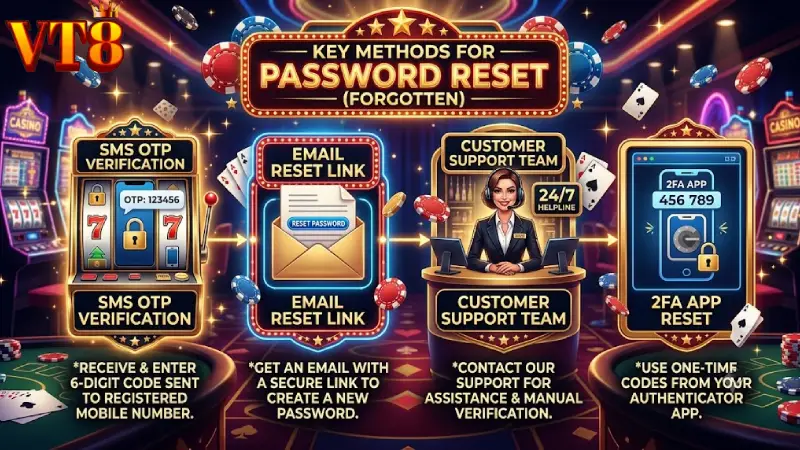
The platform provides multiple recovery channels to help users securely change login credentials and regain account access.
- SMS OTP Verification: Receive a dynamic, single-use security code directly on your registered mobile phone number.
- Email Reset Link: Request an encrypted authentication link sent to your verified primary email address.
- Customer Support Desk: Contact 24/7 live assistance if you no longer have access to your original phone or email account.
- 2FA Authenticator Reset: Use synchronized secondary verification tokens to authenticate ownership on VT8.
Automated Password Reset via SMS OTP and Registered Email
The automated self-service portal uses direct verification paths to ensure fast, secure account recovery. Selecting the SMS OTP or email recovery option sends a dynamic validation code to your verified contact details. Entering this token into the system bypasses manual verification delays, enabling immediate password updates on VT8.
Password Recovery Matrix and Troubleshooting Guide
Refer to the diagnostic framework below to address common issues encountered during a Forgot Password VT8 recovery request.
| Issue Scenario | Root Cause | Estimated Resolution Time | Recommended Action |
| Missing SMS OTP | Carrier SMS filtering or signal delay | 1 to 3 Minutes | Check signal, wait 60s, or resend OTP |
| Missing Email Link | Spam/Junk folder placement | Instant | Check Spam/Promotions folder or re-trigger |
| Account Temporary Lock | Multiple failed login attempts | 15 to 30 Minutes | Wait out lock period or contact support |
| Lost Phone / Inactive Email | Outdated contact information | 10 to 20 Minutes | Complete manual identity check on VT8 |
Handling Missing OTP Codes and Unverified Contact Details
Delayed SMS messages or missing confirmation emails often stem from network traffic or automated spam filters. If your reset link does not arrive promptly, check your email’s junk folder or verify that your phone is receiving messages. If your registered phone number or email address is no longer accessible, live support agents can assist with manual identity verification on VT8.
Step-by-Step Guide to Resetting Your VT8 Password Securely
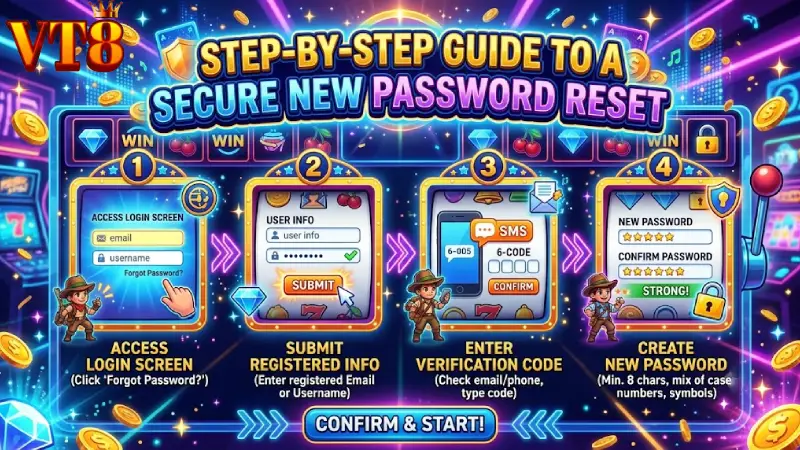
Follow this quick guide to safely change your account credentials and restore access.
- Access Login Screen: Click the login button on the official portal and select the Forgot Password VT8 link.
- Submit Registered Details: Enter your account username along with your verified phone number or email address.
- Input Verification Code: Check your device for the incoming SMS OTP or email link and enter the code into the prompt.
- Create New Password: Set a strong new password that meets standard security criteria to secure your account on VT8.
Best Practices for Account Protection and Password Management
Maintaining robust account security minimizes the need for emergency password resets while protecting your wallet balance. Create a distinct password containing uppercase letters, lowercase letters, numbers, and special characters. Avoid reusing credentials across multiple websites, and enable two-factor authentication (2FA) to add an extra layer of protection to your profile on VT8.
You might want to watch: Error deposit VT8
Conclusion Regain Access Swiftly and Keep Your Account Secure
Restoring your account access is designed to be quick, secure, and user-friendly. Understanding how to handle a Forgot Password VT8 situation ensures you can handle forgotten login details and resume playing without delay in 2026. Automated OTP protocols and round-the-clock support teams are always available to protect your identity and restore access safely. Taking time to maintain updated contact details and using strong passwords will keep your account safe long-term. Follow the standard recovery steps, update your credentials, and log back in to VT8.