
Initiating a deposit to top up your account should ideally be an instant, friction-free process, but occasional technical hiccups can interfere with automatic balance crediting. Encountering an Error deposit VT8 notification in 2026 can stem from bank gateway maintenance, incorrect transfer references, or timed-out session tokens rather than lost funds. The platform utilizes automated payment matching protocols designed to pair incoming bank transactions with user accounts instantly. When a manual input mistake or bank processing delay occurs, the system holds the transaction safely in a reconciliation queue. Understanding how automated deposit channels operate allows players to take prompt corrective steps. Following proper funding steps ensures every deposit is credited accurately. Knowing how to resolve an Error deposit VT8 prompt keeps your gaming balance ready on VT8.
Primary Causes for Deposit Delays and Uncredited Funds
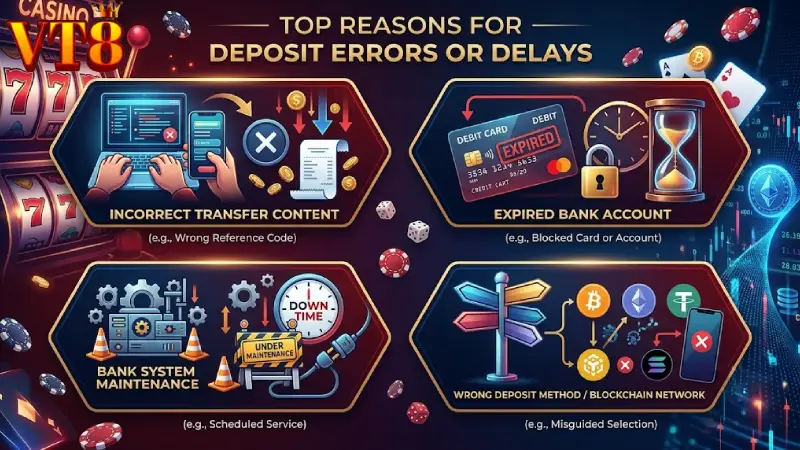
Recognizing the technical triggers that disrupt automated funding transfers allows members to rectify submission errors and ensure smooth balance updates.
- Incorrect Transfer Remarks: Omitting or misspelling the unique transaction reference code in your banking application’s memo field.
- Expired Bank Account Details: Sending funds to a previously saved recipient bank account that is no longer active in the portal system.
- Interbank Gateway Maintenance: Scheduled or unexpected interbank switching network outages delaying real-time settlement notifications.
- Incorrect Network/Gateway Selection: Selecting an incompatible crypto blockchain network or choosing an offline e-wallet channel on VT8.
Incorrect Transfer Remarks and Automated Matching Failures
The automated financial engine relies on exact reference codes embedded within the bank transfer remarks field to identify your account instantly. If you forget to include this unique code or alter its structure during transfer, the automated system cannot match incoming funds to your account. Manual verification by customer support is then required to assign the unallocated deposit on VT8.
Deposit Diagnostics and Instant Resolution Matrix
Consulting the error matrix below offers quick diagnostic insights and step-by-step resolution pathways for any Error deposit VT8 issue.
| Error Code / Symptom | Technical Cause | Estimated Resolution Time | Required Action |
| Err-D01: Unmatched Remittance | Wrong or missing transfer memo code | 5 to 15 Minutes | Provide bank receipt to live chat support |
| Err-D02: Expired Account | Sent to an archived bank recipient account | 15 to 30 Minutes | Contact support for manual account trace |
| Err-D03: Network Delay | Interbank API maintenance or delay | 30 to 60 Minutes | Wait for bank clearance or re-verify TxID |
| Err-D04: Block Collision | Wrong crypto chain chosen (e.g., TRC20 vs ERC20) | Variable | Submit transaction hash (TxID) to VT8 |
Expired Bank Account Details and Old QR Code Scans
To maintain strict security and liquidity compliance, receiving bank accounts are rotated periodically. Saving static QR codes or keeping previous recipient bank details in your mobile banking app can result in transfers being sent to offline accounts. Always fetch a fresh QR code or double-check the recipient details from the official deposit screen before completing a transaction on VT8.
Step by Step Guide to Resolving Failed Deposit Requests
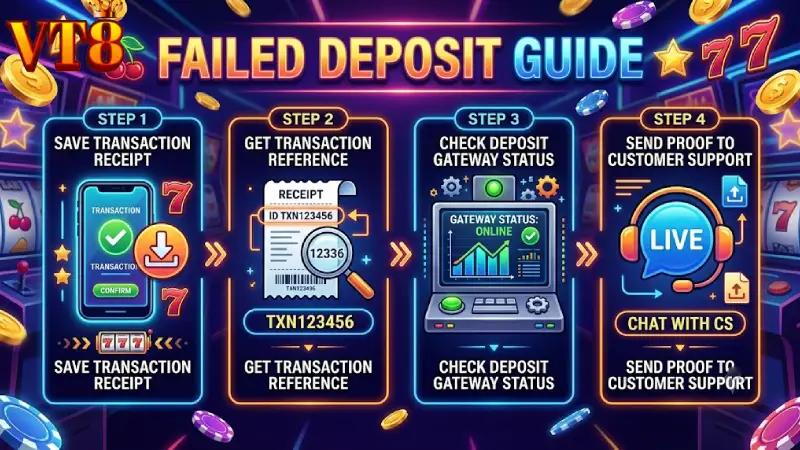
Follow this systematic guide if your bank account has been debited but your gaming balance has not updated automatically.
- Capture Official Receipt: Save a clear digital image or PDF receipt of the completed bank transfer displaying the date, amount, and reference number.
- Retrieve Transaction Reference: Copy the transaction reference ID, reference number, or blockchain hash (TxID) generated by your bank or wallet.
- Verify Deposit Gateway Status: Check whether the chosen deposit option is marked as active or undergoing maintenance on the deposit page.
- Submit Proof to CSKH Support: Send your receipt image and account ID to the 24/7 customer service team for instant manual verification on VT8.
Financial Integrity Protections and Automatic Credit Verification
Member capital security remains the highest priority across all deposit infrastructure channels. If a payment encounters a gateway timeout or manual mapping failure, funds are held securely in a system holding account until manual matching is completed. Once valid proof of transfer is provided, support teams credit your gaming balance without deductions, guaranteeing financial safety for every valid transaction on VT8.
You might want to watch: Error withdraw VT8
Conclusion Fast Resolution Protocols for Uninterrupted Gaming
Addressing deposit issues quickly ensures your account stays funded for uninterrupted gameplay. Understanding the root causes behind an Error deposit VT8 prompt—such as checking transfer remarks and verifying current bank details—helps maintain smooth deposit processing in 2026. The platform’s automated financial channels are built for security, speed, and accuracy, backed by round-the-clock support to resolve edge cases. By generating fresh deposit details for every transaction and verifying transfer receipts, you can keep your wallet ready. Confirm your deposit details, follow the standard funding steps, and enjoy fast funding on VT8.